The Concat video editor has voice cleanup built into the Audio tab of every clip. Three switches handle the usual problems with spoken audio: uneven loudness, room noise and a voice that sounds thin. You flip them on for a clip with no plugin to install and no account.
How do you clean up a voice in the Concat video editor?
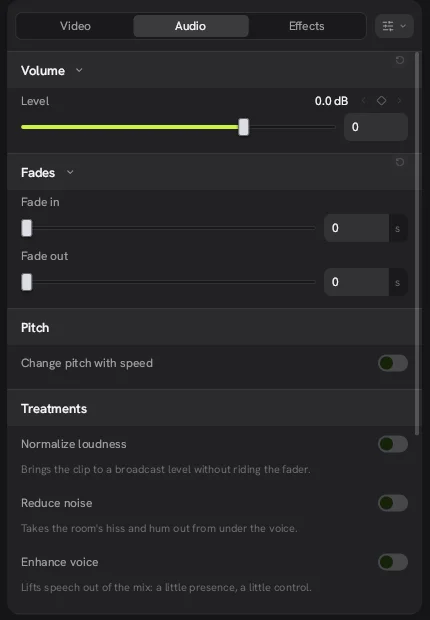
- Select the clip with the voice on the timeline.
- In the inspector, open the Audio tab.
- Scroll to Treatments.
- Switch on Reduce noise if you hear hiss or hum under the voice.
- Switch on Enhance voice if the speech sounds buried or dull.
- Switch on Normalize loudness to bring the clip to a standard level.
- Set Level under Volume and add a Fade in or Fade out if the clip starts or ends abruptly.
Press M to mute the selected clip when you want to compare it with the music or another take.
What does each switch do?
Each treatment is a single toggle with a short description in the app. Here is what they do in plain terms.
| Switch | What it does | Use it when |
|---|---|---|
| Normalize loudness | Brings the clip to a broadcast level so you do not have to ride the volume by hand | Clips were recorded at different levels |
| Reduce noise | Takes the room's hiss and hum out from under the voice | A fan, fridge or air conditioner is audible |
| Enhance voice | Adds presence and control to speech | The voice sounds far away or muddy |
The same panel holds Volume (with a keyframe diamond on Level), Fades in seconds and a Pitch switch called Change pitch with speed. Leave that last one off if you speed up a talking clip and want the voice to keep its normal pitch.
What other audio effects are there?
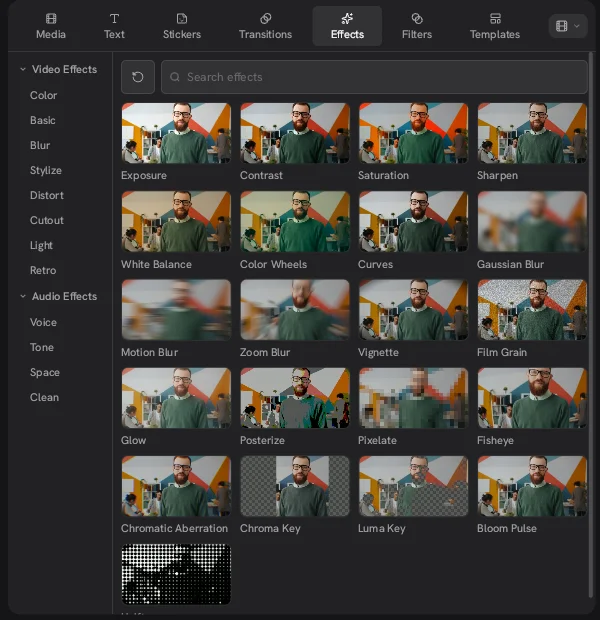
Beyond cleanup, the Effects tab in the Concat video editor has four groups of audio effects: Voice, Tone, Space and Clean. The README mentions chipmunk, robot and telephone voices among them. These are for fun edits and memes more than for fixing a recording.
How does it compare with CapCut's audio tools?
The idea is the same: a few clicks to make a phone recording sound better. What changes with the Concat video editor is cost. Nothing in the Audio tab is locked behind a plan, while in CapCut Pro assets can add a watermark on export. If you are moving your podcast clips from CapCut to the Concat app, these three switches are the first thing to try.
What are the limits?
- On or off only. We saw no strength control for the treatments in 0.2.7.
- Set in each clip. The switches sit in the clip inspector, so check every clip that carries a voice.
- It can't save a bad recording. Heavy wind, clipping or music under the voice are beyond what a denoise switch can fix.
- We did not measure results. The descriptions above come from the app's own labels, not from a loudness meter or a listening test.